← All posts
Web
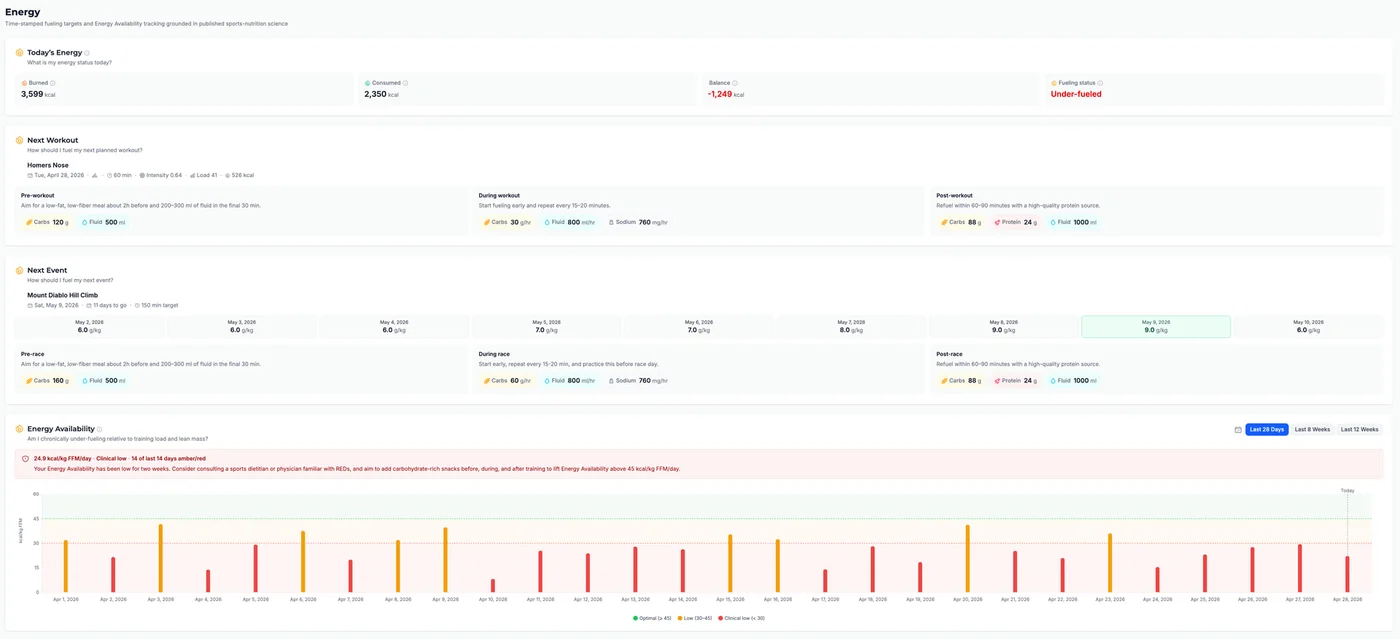
Tempo now has a dedicated Energy page that brings together fueling and energy balance in one place.
Today's Energy shows your estimated daily burn (BMR + activity + workouts), calories consumed, and current energy balance with a fueling status indicator.
Next Workout breaks down what to eat and drink before, during, and after your next scheduled session — carbs, protein, fluid, and sodium targets shown as color-coded chips, with guidance tailored to workout duration and intensity.
Next Event appears when you have a race or event coming up. It shows a day-by-day carb-loading timeline leading into race day, plus pre-race, during-race, and post-race fueling guidance. When the event has duration and intensity targets, Tempo also provides in-race carbs, fluid, and sodium targets.
Energy Availability tracks the balance between what you eat and what you burn relative to lean body mass over time. A trend chart with 28-day, 8-week, and 12-week presets color-codes each day into green, amber, or red zones, with a recommendation card summarizing your current status and what to do next.
Nutrition data is logged through the manual food log available directly on the Energy page (Apple Health sync is coming soon). Hydration and sodium targets are personalized when you fill in sweat rate, sodium concentration, and tested carb tolerance in your profile under the new Nutrition card.
Instead of guessing portions or Googling "what to eat before a 3-hour ride," you get specific targets that adjust to your body weight, session intensity, event demands, and personal tolerances. The Energy Availability trend helps catch chronic under-fueling (REDs/LEA) early and gives you a plain-language action step rather than just a raw number.
Open Energy from the main navigation. Your burned estimate (BMR + NEAT + workout calories) is populated automatically from your profile and training data.
To get the most accurate results, fill in two profile sections first:
Go to Profile -> Identity tab and open the Body & Metabolism card. Enter your weight, height, and activity factor — Tempo uses these to estimate BMR and daily energy expenditure (TDEE). Gender and date of birth improve the BMR calculation further.
Go to Profile -> Nutrition tab and open the Fueling & Hydration card. Fill in your sweat rate, sweat sodium concentration, and tested carb tolerance — these personalize hydration and sodium targets in the per-workout fueling guidance.
If you do not have tested values, you can start with estimates and adjust from experience. Many endurance athletes begin around 500-800 ml/hr sweat rate, 600-900 mg/L sweat sodium, and 30-60 g/hr carb tolerance, then refine based on conditions, gut comfort, thirst, salt marks, cramping history, and post-workout weight changes.
Consumed calories require a manual log entry or a connected nutrition source; the page shows "Log intake" until data is available for the day.
Note: The Energy page is currently in beta. To enable it, go to Settings -> Account and turn on beta testing.