
← All posts
Web
The Nutrition tab of your Profile used to be a column of empty number fields. Grams of protein per kilogram, sweat rate in milliliters per hour, sodium in milligrams per liter: all useful, and all hard to fill in if nobody has told you your numbers. Both cards on the tab now show you sensible options and what each choice does before you save it.
Protein and Fat each offer Lower, Recommended and Higher, with Custom for a value of your own. Protein is 1.2, 1.6 or 2.0 g/kg, and a line under the options says who each suits: Higher, for example, is for strength blocks, masters athletes, or when losing weight. Fat is set the same way.
Carbohydrate has no setting, on purpose. It is what is left of the day's energy once protein and fat are covered, so it rises on the days you train.
Under the options, What these settings give you shows a Rest day and a Training day side by side: grams, g/kg and share of energy for each macro, with the carbohydrate guidance range for that kind of day. Change an option and both update. If a combination falls outside the recommended ranges Tempo says so, but it never stops you saving.
An empty setting now shows the value Tempo uses in its place, such as "Not set · using 700 ml/hr", so you know what your fuel plans are built on.
Carbohydrate tolerance is a row of steps rather than a blank field: Not tested, Untrained 60, Trained 90, Highly trained 120 and Custom, in grams per hour, each with a line on what it means for your plans.
What these settings give you previews two rides, an Endurance ride (2 h, steady) and a Long hard ride (4 h, with tempo efforts), with fluid, sodium and carbohydrate per hour for each.
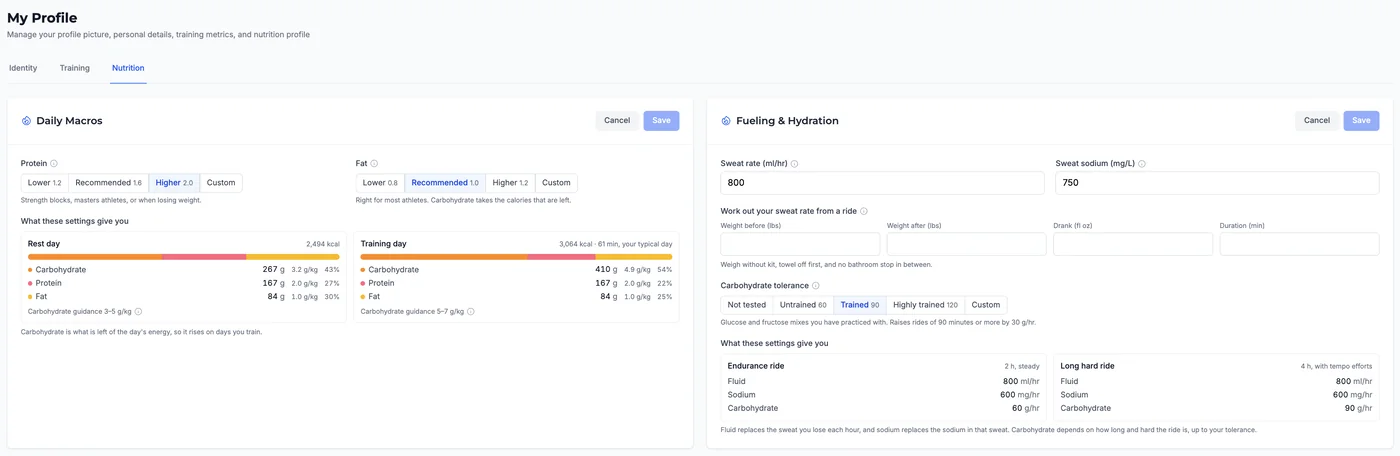
Sweat rate is the setting most athletes leave empty, because finding it sounds like a lab visit. It takes a scale and one ride. Work out your sweat rate from a ride asks for your weight before, your weight after, what you drank and how long you rode, and returns your sweat rate to the nearest 10 ml/hr. Weigh without kit, towel off first, and skip the bathroom stop in between.
The calculator only shows the number. It is yours to type into Sweat rate, since one ride on one day is a starting point: sweat rate changes with heat and intensity, so repeat the test in the conditions you race in.
Fuel plans are only as good as the settings behind them. With guided options, a new athlete gets a reasonable plan from the first day, and an experienced one sees what a change does to a real day and a real ride before committing to it.
On the web, open Profile → Nutrition. Click Edit on Daily Macros to choose protein and fat, or on Fueling & Hydration to set sweat rate, sweat sodium and carbohydrate tolerance and to run the sweat test.