← All posts
Web
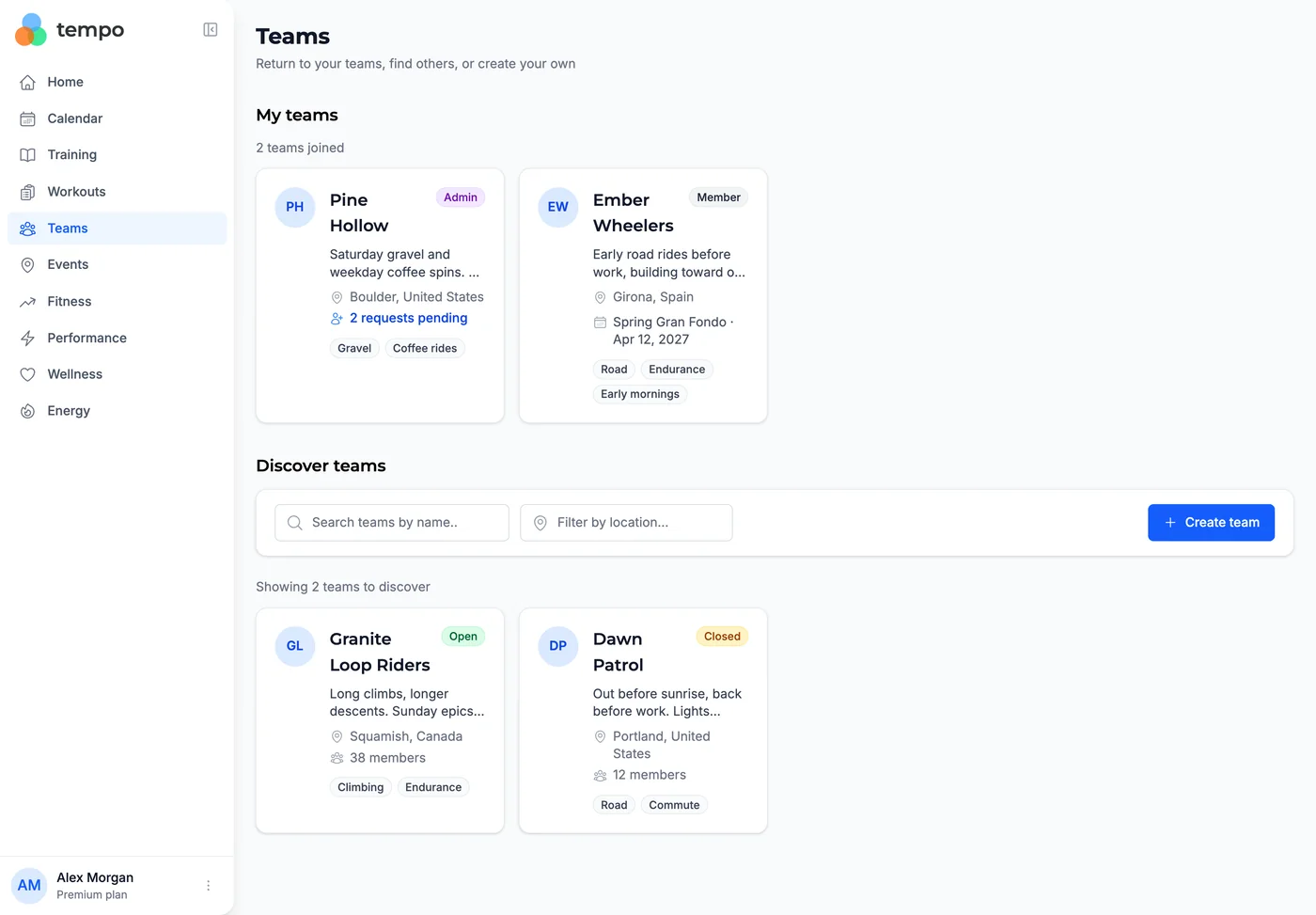
Tempo now has Teams: a place for your club, your Saturday group or the three friends you are training for an event or race with. Open Teams in the sidebar and the page is laid out in the order you need it. My teams comes first, with your role on each card and, if you are an admin, how many join requests are waiting. Pending requests lists teams you have asked to join. Discover teams lists the teams that chose to be found, searchable by name or location, each card showing the team's description, location, up to three focus tags, a target event if the team has one, and how many members it has.
Every team decides two things separately. Who can find this team? is either Listed in Discover or Invitation link only. Who can join this team? is either Open, where anyone who finds the team joins straight away, or Closed, where an admin reviews each request. New teams start as invitation only and closed, so nothing is public until you choose it. Whatever you pick, conversations and the member list stay visible to members only. Invitations are links from Members → Invite members: any member can create one in an open team, only admins in a closed one, and each link expires after 30 days or whenever you revoke it.
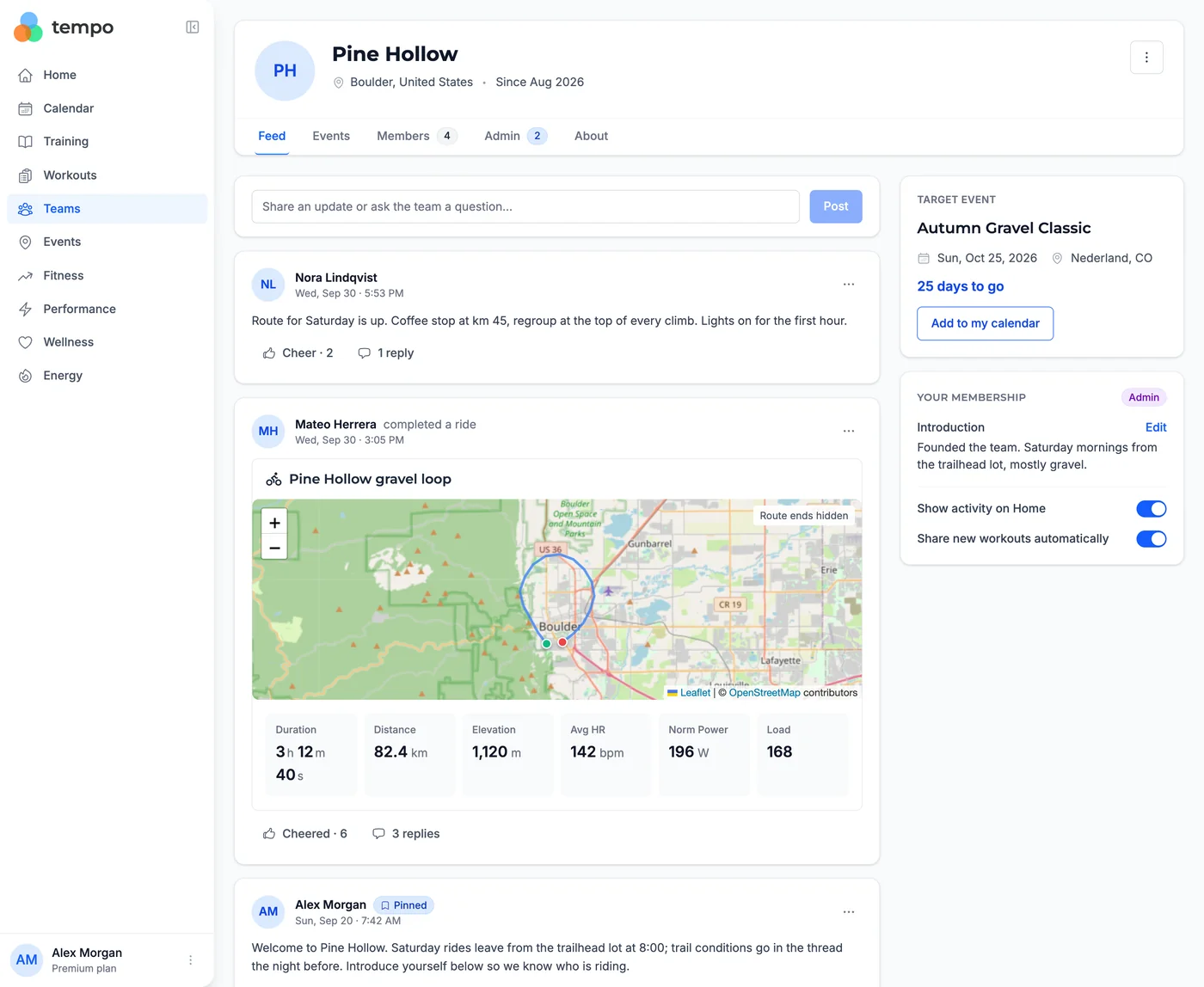
Inside a team, members get five tabs. Feed is the conversation: posts in Markdown, replies inside each post, a Cheer for the ones you like, and pinned posts from admins. Events holds rides the team is doing together; Add to my calendar copies one into your own calendar, where your priority, pacing plan and notes stay private, and if the organizer later changes the details you are asked to review them rather than having your entry rewritten. Admins can mark one event as the team's target, which shows as a countdown at the top of the feed. Members has the roster and invitations, Admin is where admins handle join requests, reports, admin roles and deleting the team, and About is what everyone sees before joining.
Rides share themselves. Once you are in a team, each workout you complete afterwards posts a card to the team's feed, if the team shares that kind of workout (cycling, running or both, chosen by its admins). The card reads like the workout page: the title, then a tile each for Duration (moving time), Distance, Elevation, Avg HR, Norm Power and Load, leaving out any the ride did not record. Outdoor rides also carry a map captioned Route ends hidden, drawn from the ride's GPS track with every point within 500 meters of the start and the finish removed. Indoor rides record no positions, so they show no map. The post is dated when it was shared; the time you set off is never shown. Workouts from before you joined and historical imports are never posted, and you can delete any card of yours. Sharing is a per-team choice: the Your membership card on a team's feed has a Share new workouts automatically switch, on when you join, that you can turn off to stay a member without posting your rides there, and a Show activity on Home switch that keeps a team out of Team updates.
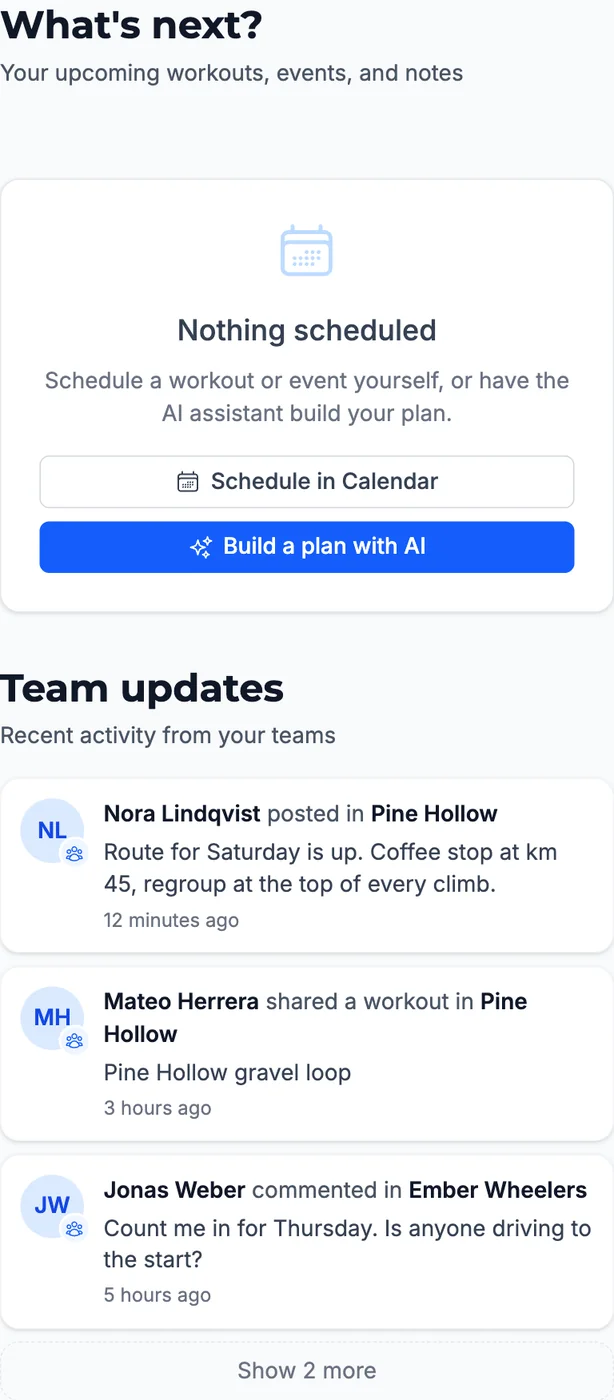
Home has a new Team updates section in the right-hand column, under What's next: "Recent activity from your teams". It lists up to eight conversations from the last seven days, newest first, each leading with the person: their photo with the team's logo as a badge, "Sam posted in Dawn Patrol", a two-line excerpt and how long ago it happened. Your own posts are left out, but a teammate's reply to one of them brings that conversation back. The three newest show first, with Show N more below them. The list refreshes every minute while Home is open, and clicking an entry opens that conversation on the team page.
Most riders train with other people but keep the social side somewhere else: a group chat that has no idea what anyone rode, and a training app that has no idea who you ride with. Teams puts the conversation next to the training, so "how was Sunday?" comes with the ride already attached, and nobody has to remember to upload a screenshot.
Team updates means you don't have to go looking. The morning you check your Form and what's planned for today, you also see that your teammate finished their long ride, that someone asked about Saturday's route, and that there's a question waiting for you. Because it only shows other people's activity, it stays a list of things you might want to reply to rather than an echo of your own posts.
The defaults are built around privacy. A new team is hidden and approval-only until an admin changes that, only members see the conversation and the roster, the route on a shared ride never shows where it started or ended, and you can switch automatic sharing off for any team while staying in it.
Open Teams from the sidebar. Search Discover teams by name or location and open a team to read its About page, then Join team or Request to join. To start your own, click Create team, give it a name, a description and a location, choose what it shares and who can find and join it, then send people a link from Members → Invite members.
Once you are in a team, open Home: Team updates sits below What's next on a wide screen, and further down the page on a phone. If you have not joined a team yet it shows No teams yet with a Browse teams button, which you can dismiss if teams are not for you.
Note: Teams is free for every Tempo athlete, on the web and in mobile browsers. It uses the first and last name on your account, so both need to be filled in before you can create, join or post.
A made-up team, Pine Hollow, as its admin sees it. The Teams page lists the two teams they belong to and two more to discover:
Pine Hollow's feed, with a post, a teammate's ride that posted itself, the target event countdown and the membership card with both sharing switches:
And the right-hand column of Home, where Team updates sits under What's next: