← All posts
Web
Beta
Premium riders on the Web can get a Threshold Heart Rate suggestion in the same spirit as estimated FTP. Tempo scans your last 42 days of qualifying rides and runs, finds your strongest sustained heart-rate effort in each sport, and proposes a threshold heart rate using 0.95 × max 20-minute average HR, rounded to the nearest bpm. For example, a qualifying 20-minute average of 172 bpm gives 163 bpm after the adjustment.
This follows Joe Friel's 20-minute field-test approximation, which assumes a maximal, steady solo effort. Tempo's qualifying workouts are not necessarily maximal tests, so a suggestion is an estimate, not a direct measurement of lactate threshold or proof that your fitness has changed. Keep a threshold from a reliable test unless you have stronger evidence to change it. The 30-minute test protocol is different: it uses the final 20 minutes' average HR without the 5% reduction.
Threshold HR is a single reference value used to calculate training zones, not the lower boundary of the Threshold zone. In Tempo's current zone model, a threshold setting of 163 bpm gives a Threshold zone of 154–171 bpm; a setting of 172 bpm gives 162–180 bpm, with the upper limit capped by your max HR. The current and suggested values are alternative settings, not the endpoints of one range.
Estimates from different apps can disagree because they use different methods and source workouts. That difference alone does not establish which estimate is more accurate for you or show that your threshold has fallen.
What counts as qualifying: a completed ride or run in the last 42 days with at least 20 minutes of active time and usable heart-rate data. Tempo evaluates the workout's strongest continuous 20-minute window, so warm-ups, recoveries, and cool-downs do not dilute an otherwise valid threshold effort. For rides, the best 20-minute power window must reach 93% of your FTP (the threshold band—sweet-spot rides are excluded), so rides need power data and you need an FTP set. For runs, and as an extra check on rides, the window's heart rate must reach the bottom of your threshold zone: 85% of max HR, or 95% of your current sport-specific LTHR when max HR is not set. Runs need one of those two anchors.
Threshold HR sets your heart rate zones and contributes to HR-based Load calculations. The modal explains the adjustment and the effects of accepting, so you can compare the suggestion with your testing history before changing your setting.
On Profile -> Cardiovascular you'll see Cycling Threshold HR and Running Threshold HR, each with its own Re-estimate button so you can update one sport at a time. Tempo still keeps one pending suggestion on your account—a new estimate for either sport replaces any other pending suggestion until you accept or dismiss it.
If the requested sport has no qualifying data, Tempo shows an explanation and clears any older pending suggestion. It does not open the other sport's modal. A connection error also leaves a previously dismissed suggestion closed.
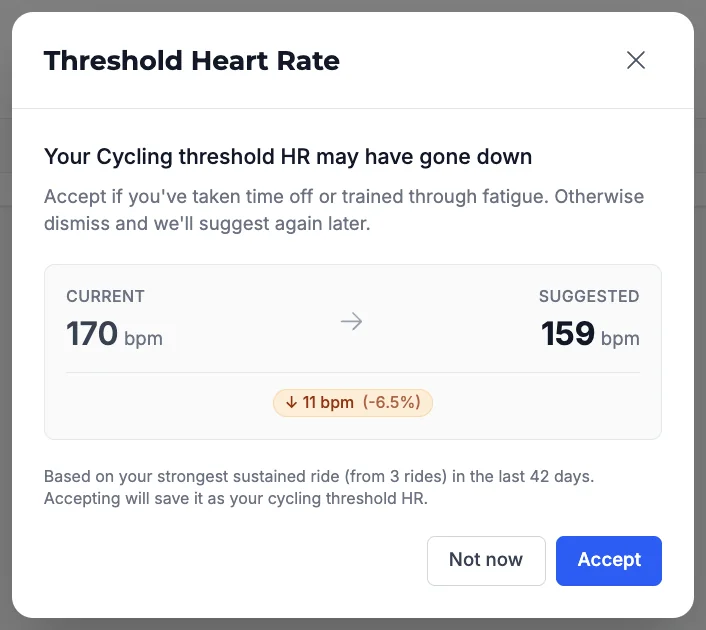
When a suggestion is ready, the Threshold Heart Rate modal opens with the sport in the title. It shows current vs suggested BPM, a change badge, and how many efforts were analyzed in the window. The formula and immediate effects of accepting stay visible; expand How this estimate works for test limitations and further metric details. Accept saves the value for that sport. Not now clears the suggestion so it won't keep popping up on every visit. Changes under about 2% are treated as no meaningful change—the modal explains that and closes without an Accept step. Large downward moves (about 10% or more) include a short sanity-check reminder before you lower threshold HR.
Accept updates the sport you're confirming and its heart rate zone table in your profile. New workouts use that sport's threshold for time in HR zones and for Load when calculated from HR. With other inputs unchanged, a lower threshold increases HR-based Load for the same effort; this can affect future Fitness, Fatigue, and Form through those Load values. Cycling workouts with power-based Load continue to use FTP.
Accepting does not change your FTP or power-based Load, or automatically recalculate past workouts. The cycling threshold also informs future HR-based FTP suggestions. If General Threshold HR is Not set, accepting fills it too; otherwise it stays unchanged. Some workout HR labels and general coaching context still use that general setting, so accepting a sport-specific estimate does not change every HR display. When both sport-specific values are set, the profile shows separate cycling and running zone tables.
A weekly background check can propose updates automatically for eligible Premium beta riders. On that path, if both sports have enough data, Tempo surfaces one suggestion at a time: it favors the sport with more usable threshold efforts (not just any ride in the window), then the larger change vs your current value for that sport, with a short footer noting the other sport's candidate. You can also run Re-estimate yourself anytime from Cardiovascular—cycling and running independently.
Note: Threshold HR detection requires a Premium subscription and is available to beta testers on web while we roll it out.